Google isn’t your friend.
I remember the exact thing that made me decide to move away from using Google services: in February 2025 when they changed Gulf of Mexico to Gulf of America on Maps. It seemed like such an obvious ploy to pander to their fellow racists; I wasn’t surprised at what Google/Alphabet have done since then. It’s been documented that Maps has the power to change cities, as neighbourhoods are erased and new neighbourhoods are invented. As people move to a city the new names start getting used, and before you know it, it becomes standard nomenclature. Here are two separate articles (NYTimes, Sunnyside History) about Google’s arbitrary neighbourhood-naming just in San Francisco. Who knows what dumbass stuff they’re doing in non-English-speaking countries.
“Balboa Park” is an invented neighborhood that was added to Google Maps a few years ago. It is in the typeface used for neighborhoods, not parks. Perhaps it is this all-new neighborhood that has crowded out Mission Terrace from being labeled on the map.
People who live here know that there is a public park and a BART/Muni station by the name of Balboa Park—but there is no neighborhood called that. The Planning Dept’s SFFind does not include “Balboa Park” as a neighborhood or district.
But the search results on Google insist there is such a neighborhood—going so far as to clearly delineate its boundaries (below)—even though the information from Wikipedia contradicts that, and the photos shown are largely of a park with the same name in San Diego!
Inventions and Erasures: Google Maps Remakes or Unmakes Your Neighborhood – Amy O’Hair, sunnysidehistory.org
So when the “Gulf of America” fiasco happened, they knew that making this change on their end would only speed up the adoption of the term. Of course, nobody else in the world is actually calling the Gulf of Mexico anything else, but the people making these decisions know they’re dealing with indifferent people who don’t care.
I had my life wrapped up in several Google products: Gmail, Calendar, Maps, Photos, Drive, Search, Keep, Chrome, Play store, Fi, and Android. I’ll say up front some of these are hard to stop using (Android, Play store) and some don’t have great replacements (Maps). As for the rest of it, one alternative jumped out at me immediately.
What I use.
Proton is a very straightforward Google alternative. It has a similar structure of having multiple services under one umbrella: Mail, Calendar, Drive, and even a VPN. They also have a password manager, Pass, that I use for email aliases though don’t recommend storing your passwords in there; and an Authenticator, which I also don’t recommend using. There’s nothing wrong with the function of Pass and Authenticator, it’s just not smart to put everything in one place in case your account gets compromised.
I started with the Proton Unlimited plan, which is $13/month. Not as good as free, but if that’s what my data is worth, I’d rather just pay it. They do have a free tier though, only Mail and Calendar, so check that out.
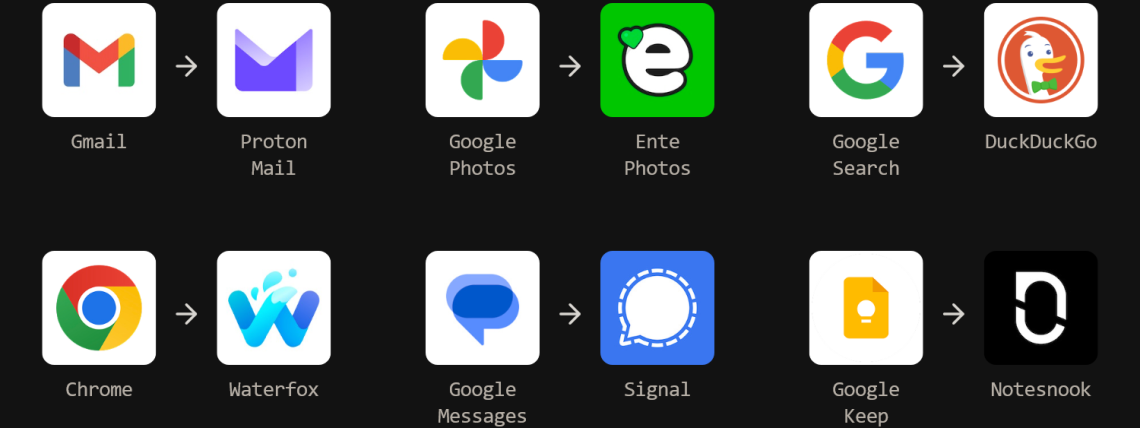
Gmail -> Proton Mail: You have the option of auto-forwarding your emails to your new @pm.me email (free tier has @proton.me), or (and this is the better option) starting fresh. You’ll have to slowly move your accounts over to the new email – by far the biggest pain in the arse – but after several weeks you should be in a good enough place to only check your old email occasionally, if at all. By far my biggest issue with it is that there doesn’t seem to be a memorable URL that takes you straight to your inbox, à la gmail.com. It’s easy to use your custom domains, something you definitely can’t do with Gmail!
GDrive -> Proton Drive: Similar in functionality to Google Drive, you have the standard web and desktop-sync clients. The available sizes are smaller though, only 500 GB per person. If you have the Family account, you have 3 TB which can be allocated by the admin on a per-user basis.
Proton VPN: I used to use NordVPN, but Proton is just as good and cheaper. It’s based in Switzerland, and just passed their 2025 No Logs audit.
Chrome -> Waterfox: This was the easy Chrome alternative, as I was already using it. The majority of browsers now are based on Chromium, and any changes Google makes will follow onto your other browsers. As far as I can tell, it has all the same functionality as Chrome, including most browser extensions. It’s more privacy based than Firefox, and I’m still exploring what exactly this means.
Google.com -> DuckDuckGo: As far as search engines go, it’s fine. Its search algorithm is based on Bing, so it suffers from a lot of the same enshitification that big companies will eventually go to. It’s worse than old-Google, and about the same as current-Google. Being privacy based, it removes trackers as you search. You can also get a duck.com email address and free VPN to remove trackers.
Google Photos -> Ente.io (paid): This Google Photos replacement is a hot new privacy startup. End-to-end encrypted photos and videos, with client-side machine learning so that you can still search photos by content. Is the search as good as Photos? No. But I prefer it that way because I know they’re not sending my data back to train their ML model.
Google Keep -> Notesnook/Obsidian: Keep was excellent at arranging a lot of short information. Notesnook is fine, but their UI lends itself more to longer-form content, though that’s not how I use it. Obsidian is fantastic as a sort of personal wiki to cross-link pages, but it requires some knowledge of markdown and probably a Youtube video to learn how to use it to the full extent.
Bitwarden: After not being able to get my then-partner to adopt a completely manual password manager, I looked for alternatives. 1Password seemed like a good option until people complained about not getting into their only-online accounts. I’m so happy with Bitwarden; it has online and offline options, allows 95% of its functions without payment, the UI is actually usable, and you can self-host. They’re not open source, which may be a deal-breaker for some, but they are regularly audited.
What I don’t use.
Proton Pass: Ehhhhhh. I mean, the functionality is great and all, but having your passwords stored along with your everything else is just asking for trouble. Pass does have a good password-managing system, with generated usernames and passwords, as well as credit card and ID storage. I wouldn’t use any of that though, I’d only use the Alias feature. Aliasing creates a brand-new email address and forwards it to your regular inbox. I think this feature should be inherently part of Proton Mail, I’m not a fan of it being here.
Firefox: The company, Mozilla, does good work supporting internet privacy startups. However, the CEO of Mozilla, Anthony Enzor-DeMeo, is obsessed with integrating AI into the browser, further solidifying the enshitification of the internet.
Proton Lumo: It’s a privacy-based Large Language Model they made look cute by dressing the app up like a cat. No thanks.
Keepass2: Robust and excellent. Ugly as hell (seriously, check out that website!), almost completely manual, and not usable by people who aren’t going to maintain their list. I couldn’t get my then-partner to use it.
What I can’t replace easily.
Android: I’ve considered moving over to Apple’s ecosystem, but ultimately switching one for the other isn’t really better. I’ve kept an eye on GrapheneOS, a privacy-based mobile OS, but the hardware is limited to Pixel phones. This would have the double-whammy of getting me off the Play Store.
Maps: OpenStreetMap is an alternative I tried for about a month, but as a person who almost exclusively uses public transit, I lose too much functionality with transit navigation.
Google Fi: This is Google’s mobile carrier. It’s good, but I’m somewhat locked into it. I hope to revisit this one in the future, probably moving to Mint Mobile.



This is very useful information to have in one list! To add to your information here, I use the free duck duck go suite, which in addition to the browser includes a Gmail email filter (an email @duck.com, and a single use email generator for spam, both of which strip emails of trackers before sending them on to your Gmail), an app tracking blocker (which blocks most attempts of apps on your phone from sending out your information even when you’re not using them and creates a nifty report that shows you how many tracking attempts have been blocked and by whom), and password keeper (this doesn’t directly fill in info to your apps, but you just go into the keeper to copy and then paste into the app). They have a VPN, but this feature is now part of their paid tier. Thanks for sharing your research! Keep up the good work!