If you want a guide on how to set up an *arr stack, or what it even is, I can’t recommend the Servers@Home Wiki enough. You need to protect your torrent client from accessing your regular internet connection.
Server hardware: AOOSTAR R1 (2 Bay, Intel N100 / 16+512G)
OS: TrueNAS Scale ElectricEel
Under TrueNAS’ Apps menu, I run almost everything inside dockge, a Docker container stack manager.

The Wiki guide has excellent instructions I don’t need to replicate, but when you get to step 3 (Get your .conf file for your VPN) they use Hotio+AirVPN as an example. I run Gluetun+ProtonVPN.
To get your WireGuard conf file, go to account.protonvpn.com > Downloads > WireGuard configuration. Enter these settings:
1. Name: arrstack
2. Platform: GNU/Linux
3. VPN options: no filter, select NAT-PMP (Port Forwarding), VPN Accelerator
4. Pick a region, or select the default option and click Create
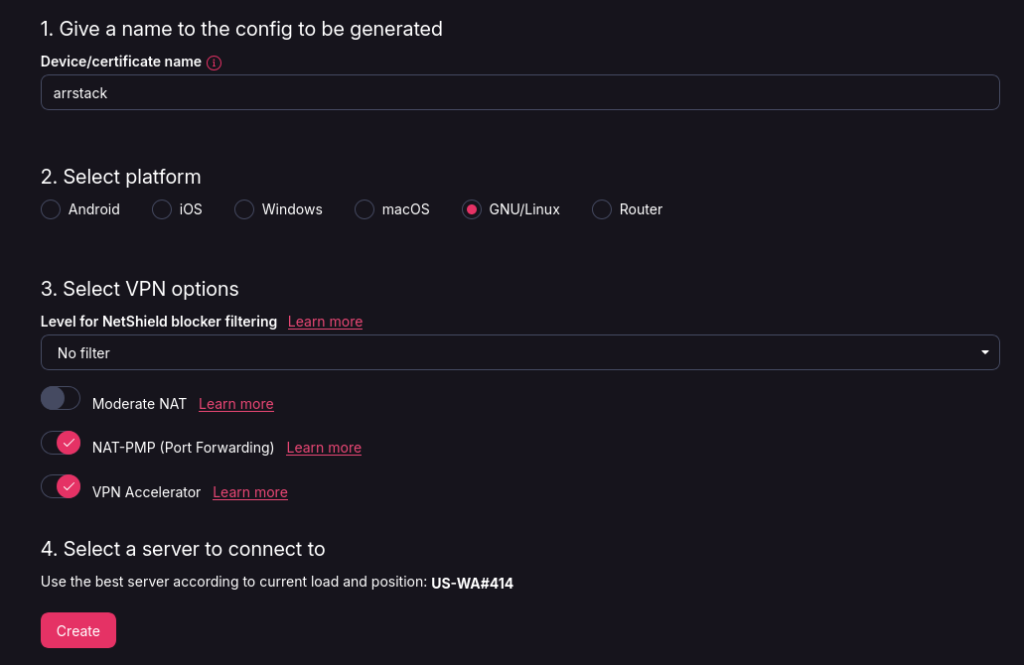
You’ll get a popup that looks like this. That’s the conf file we need, so go ahead and download it.
[Interface]
# Key for test
# Bouncing = 20
# NetShield = 0
# Moderate NAT = off
# NAT-PMP (Port Forwarding) = on
# VPN Accelerator = on
PrivateKey = *****
Address = X.X.X.X/32
DNS = X.X.X.X

[Peer]
# US-WA#414
PublicKey = jMdLQAw7d2Vc01Ono8G/hg40j5rqMa70OnHlL+qLeG8=
AllowedIPs = 0.0.0.0/0, ::/0
Endpoint = 149.40.51.225:51820
So now we have our keys, go back to dockge in TrueNAS, compose a new stack, and paste the following making sure to update the volume path, WG private key, addresses, public key, and endpoint.
services:
  gluetun:
    image: qmcgaw/gluetun:latest
    container_name: gluetun
    restart: unless-stopped
    cap_add:
      - NET_ADMIN
    devices:
      - /dev/net/tun:/dev/net/tun
    ports:
      - 8888:8888/tcp # HTTP proxy
      - 8080:8080 #qbittorrent webUI port
      - 6881:6881 #qbittorrent torrenting port
      - 6881:6881/udp #qbittorrent
    volumes:
      - /mnt/DATASETNAME/Config/gluetun:/gluetun
    environment:
      - VPN_TYPE=wireguard
      - VPN_SERVICE_PROVIDER=protonvpn
      - WIREGUARD_PRIVATE_KEY=*****
      - WIREGUARD_ADDRESSES=X.X.X.X/32
      - WIREGUARD_PUBLIC_KEY=jMdLQAw7d2Vc01Ono8G/hg40j5rqMa70OnHlL+qLeG8=
      - WIREGUARD_ENDPOINT_149.40.51.225
networks: {}
If all goes well, you’ll see a startup message like this: